Your Odoo connection details
When you connect Claude to your Odoo, the form asks for four things: your Odoo URL, database name, login, and a read-only API key. Here is how to find each one.
1. Your Odoo URL
The web address you use to open Odoo — e.g. https://yourcompany.odoo.com (Odoo Online) or https://odoo.yourcompany.com (self-hosted / Odoo.sh).
- Use only the base address:
https://+ the domain (no/web/...path). - It must start with
https://.
2. Your database name
This is the field that trips people up most.
- Odoo Online (
*.odoo.com): usually the part before.odoo.com. Forhttps://acme.odoo.comthe database is usuallyacme. - Odoo.sh: the pattern is
project-branch-id(e.g.acme-main-12345); see your Odoo.sh dashboard → Branches. - Self-hosted: ask whoever administers your server.
- If unsure: confirm with your Odoo administrator or your Tecnicora consultant.
3. Your login (user)
The username you sign in with. It is often an email (you@company.com), but it can be a plain username (e.g. jdoe) with no @. Enter exactly what you use to log in.
Best practice
Create a dedicated read-only integration user for Claude and connect with that user. Claude can only read what that user is allowed to see in Odoo.
4. Generate a read-only API key
An API key lets Claude authenticate as you without sharing your password. It is shown only once.
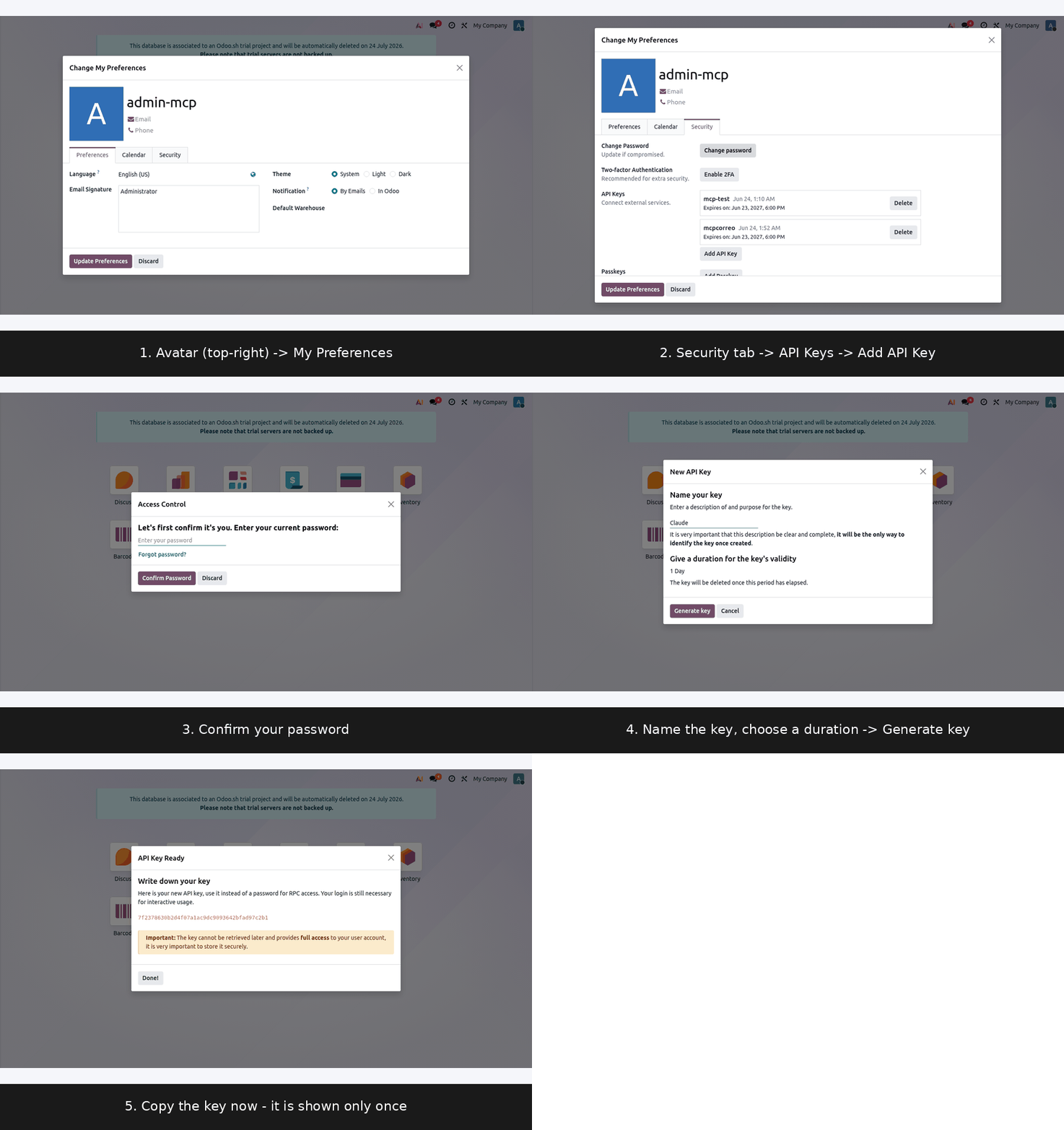
- Click your avatar (top-right) → My Preferences, then open the Security tab.
- Under API Keys, click Add API Key.
- Confirm it's you: enter your Odoo password → Confirm Password.
- Name your key (e.g.
Claude) and choose a validity duration → Generate key. - Copy the key immediately — it is shown only once — then click Done. Paste it into the connector form.
Note
If you don't see the Security tab or API Keys (older Odoo versions), enable Developer Mode first: Settings → Developer Tools → Activate the developer mode, then reopen My Preferences.
Putting it together
| Field | Example |
|---|---|
| Odoo URL | https://acme.odoo.com |
| Database | acme |
| Login | you@acme.com (or your username) |
| API key | the key you just copied |
Security
The connector is read-only and your API key is stored encrypted — no human at Tecnicora can see it. Revoke it any time from My Preferences → Security → API Keys.